
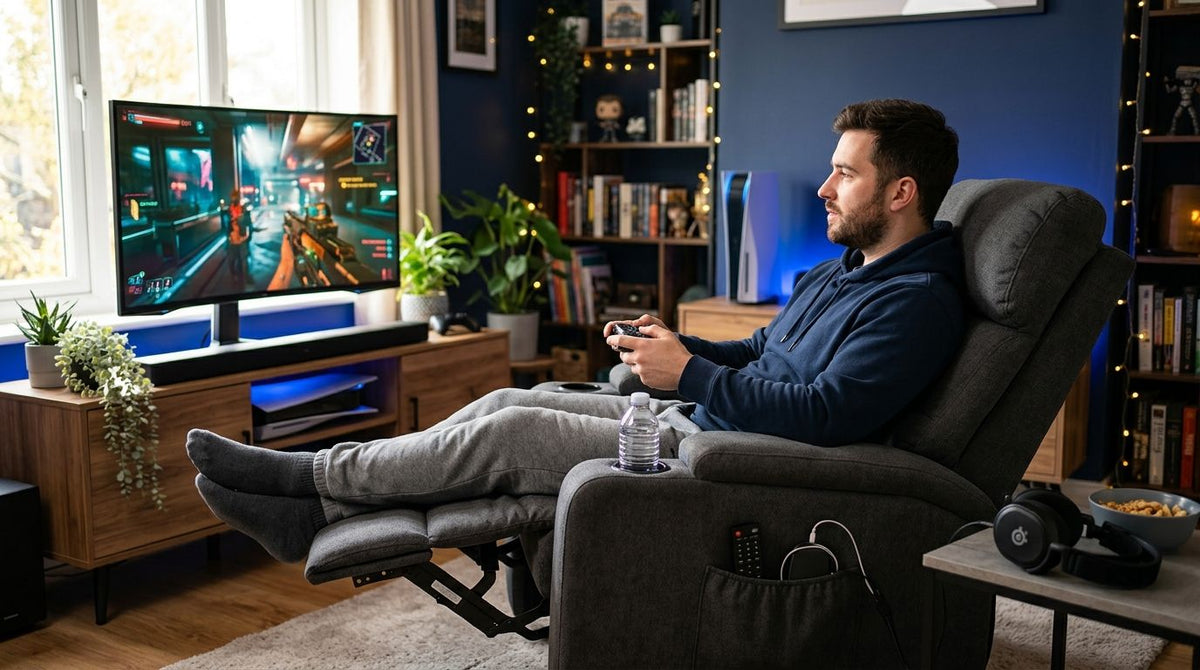
Best overall for 2026: CloudFloat Zero Gravity Recliner Chair with Heat and Massage. Best for tight gaming rooms: Nimbus Zero Gravity Power Recliner with Power Headrest and Wall Hugger Design. Best budget option: Royalease Lift Chair. All three outlast a mesh esports chair on a four-hour session because they recline further, redistribute weight off the spine, and add heat or massage that gaming chairs skip entirely.
- CloudFloat Zero Gravity Recliner Chair is the best recliner for gaming in 2026 overall, with a 139° zero gravity recline plus heat and massage.
- Nimbus Zero Gravity Power Recliner uses a wall hugger design that reclines fully within a few inches of a wall.
- Luna Swivel Rocker Power Recliner turns a full 270° between monitor, desk, and console without you standing up.
- StashEase Oversized Lift Chair's 28-inch wide seat fits gamers a standard recliner squeezes.
- Royalease Lift Chair is the budget entry, with a 9-zone heated backrest and no zero gravity premium.
Why this matters
Long gaming sessions punish the hips, lower back, and knees the same way a long shift in an office chair does — hour three or four is when posture collapses and circulation in the legs slows down. A gaming chair holds you upright at roughly 90 to 100 degrees, which is the wrong angle for sitting still for hours at a stretch.
Recliners solve a different problem. Models in Edward Creation's lineup of recliners open the hip angle well past 130 degrees, closer to what reduces lumbar load during extended sitting. Add zero gravity recline, heat, or massage, and a recliner functionally out-comforts a standard gaming chair for anyone playing four-plus hours at a stretch, whether that's console play on a TV or PC gaming from a couch setup.
None of the six chairs below are marketed as gaming chairs. They're mobility and wellness recliners repurposed for the job in 2026, so the honest tradeoffs around desk height and keyboard reach show up in the cons section for every pick, including the top choice.
What makes the best recliner for gaming
- Deep recline angle or true zero gravity — redistributes weight off the tailbone and lower spine past the 90-minute mark.
- Built-in heat and massage — keeps circulation moving in the calves and lower back when you're not getting up between rounds.
- Wall hugger or low clearance design — reclines fully without needing 12+ inches of space behind the chair.
- Swivel base — rotates toward a monitor, a desk, or a second screen without standing.
- Wide seat and stated weight capacity — a narrow seat pinches at the hips after two hours; look for 24 inches or wider.
- USB charging or side-table access — keeps a controller or headset topped off without breaking recline.
How much recline do you actually need for gaming
Recline angle breaks into three practical zones. Desk gaming with a keyboard and mouse works best around 100 to 110 degrees, upright enough to reach the desk without straining forward. Controller or couch gaming opens that up to 130-150 degrees, where you're reclined but still watching the screen comfortably. Full zero gravity past 150 degrees is for breaks, streaming, or the tail end of a long session when you want to lay back without leaving the room. Matching the chair to how you actually play matters more than any single spec on this list.
Best recliner for gaming: at a glance
| Recliner | Best for | Standout feature | Key limitation |
|---|---|---|---|
| CloudFloat Zero Gravity Recliner Chair with Heat and Massage | Long gaming sessions overall | 139° true zero gravity recline with heat and massage | Zero gravity angle isn't practical for active mouse-and-keyboard play |
| Nimbus Zero Gravity Power Recliner with Power Headrest and Wall Hugger Design | Tight gaming rooms | Wall hugger design reclines fully close to a wall | Power headrest adds bulk some rooms still can't clear |
| Luna Swivel Rocker Power Recliner with Heat & Massage | Multi-monitor and desk setups | 270° swivel base with up to 160° recline | Doesn't lay fully flat, so it's not built for marathon reclined sessions |
| StashEase Oversized Lift Chair | Bigger-frame gamers | 28-inch wide seat | Larger footprint eats floor space in small rooms |
| ZeroG Zero Gravity Lift Chair Recliner | Marathon lay-flat sessions | Full zero gravity recline for extended stillness | Lift-assist motor is a mobility feature you may not need |
| Royalease Lift Chair | Budget-conscious gamers | 9-zone heated backrest | Fewer recline stages than the zero gravity models above |
1. CloudFloat Zero Gravity Recliner Chair with Heat and Massage: best recliner for gaming overall
The CloudFloat Zero Gravity Recliner Chair with Heat and Massage opens to a 139-degree true zero gravity position, lifting the legs above heart level and taking pressure off the lower back — the same principle behind zero gravity patio loungers, applied indoors with a built-in USB charger and massage motor. For a session that runs past the two-hour mark, that recline angle does more for comfort than a headrest wing or a cup holder ever will.
CloudFloat pros:
- 139° zero gravity recline redistributes weight off the tailbone
- Built-in heat and massage for stiff shoulders and lower back
- USB charging port keeps a controller or headset alive mid-session
CloudFloat cons:
- Zero gravity angle raises the legs, which doesn't work for desk-height mouse and keyboard play
- Faux leather runs warmer than fabric during long sessions
- No swivel base, so it stays fixed facing one direction
Best for: console or couch gaming sessions of two hours or more. Verdict: Buy.
2. Nimbus Zero Gravity Power Recliner with Power Headrest and Wall Hugger Design: best recliner for gaming in small rooms
The Nimbus Zero Gravity Power Recliner is built for rooms where a standard recliner can't fully open. Wall hugger construction slides the seat forward as it reclines instead of swinging the whole chair backward, so it can sit close to a wall and still reach a full zero gravity position — useful in a bedroom-turned-gaming-setup or a basement corner.
Nimbus pros:
- Wall hugger mechanism needs minimal clearance behind the chair
- Power headrest adjusts independently for screen height
- Zero gravity recline available even in a tight footprint
Nimbus cons:
- Power headrest adds a second motor to manage
- Wall hugger chairs still need side clearance, which small rooms often forget to measure
- No stated massage function on this model
Best for: small or converted rooms with limited clearance behind the chair. Verdict: Buy.
3. Luna Swivel Rocker Power Recliner with Heat & Massage: best recliner for gaming with multiple screens
The Luna Swivel Rocker Power Recliner rotates a full 270 degrees on its base and reclines up to 160 degrees, so you can turn from a TV to a desk monitor to a second screen without standing up. Velvet upholstery and a rocker motion make it feel closer to a living room chair than the boxier lift chairs on this list.
Luna pros:
- 270° swivel covers a full multi-monitor setup
- Heat and massage functions built into the base
- Rocker motion for casual movement during loading screens
Luna cons:
- 160° recline doesn't lay fully flat, so it's not the pick for extended reclined sessions
- Velvet upholstery shows wear faster than leather in high-traffic gaming rooms
- Swivel mechanism sits higher off the floor, which changes desk height compared to a fixed recliner
Best for: gamers running more than one screen who need to swivel between them. Verdict: Buy.
4. StashEase Oversized Lift Chair: best recliner for gaming for bigger frames
The StashEase Oversized Lift Chair carries a 28-inch wide seat, several inches past what most standard recliners offer, built originally for larger-frame users who need more hip and shoulder room. Over a four-hour session, that width matters the same way it matters for anyone sitting still for long stretches at a time.
StashEase pros:
- 28-inch wide seat gives extra hip and shoulder room
- Lift-assist function helps anyone getting in and out repeatedly during breaks
- Reinforced frame built for higher weight capacities
StashEase cons:
- Wider seat means a bigger footprint in a room that's already tight
- Lift function is a mobility feature most gamers won't ever use
- Bulkier profile than the swivel or wall hugger options above
Best for: gamers who need more seat width than a standard recliner provides. Verdict: Buy if space allows.
5. ZeroG Zero Gravity Lift Chair Recliner: best recliner for gaming marathons
The ZeroG Zero Gravity Lift Chair Recliner reclines into a full zero gravity position built for extended stillness, the same use case as an all-day recovery chair. It's the closest thing on this list to a nap-ready gaming chair for back-to-back sessions between matches.
ZeroG pros:
- Full zero gravity recline for extended, motionless sessions
- Lift-assist motor helps with repeated in-and-out during breaks
- Sturdy frame built for daily, heavy use
ZeroG cons:
- Lift function adds a feature built around mobility, not gaming
- No stated heat or massage function on this model
- Larger footprint than the swivel-based options
Best for: back-to-back gaming sessions where you want to lay flat between rounds. Verdict: Buy for marathon setups.
6. Royalease Lift Chair: best budget recliner for gaming
The Royalease Lift Chair is the lowest-cost entry in this lineup and still carries a 9-zone heated backrest, covering more surface area than a single heat pad. It trades the zero gravity recline and swivel base of the picks above for a lower price point.
Royalease pros:
- 9-zone heated backrest covers more surface area than a single-zone pad
- Lowest price point in this lineup
- Straightforward recline without extra motors to manage
Royalease cons:
- No zero gravity or lay-flat recline stage
- No swivel base for multi-screen setups
- Lift-assist motor is a mobility feature, not a gaming one
Best for: gamers who want heat therapy without paying for zero gravity or swivel features. Verdict: Buy on a budget.
How we ranked these
Every option came from Edward Creation's mobility and wellness catalog and got measured against the criteria above: recline angle, heat and massage, footprint, swivel range, seat width, and charging access. The ranking favors recline range and heat or massage over swivel or width, because posture support matters more than screen access for most gaming sessions in 2026.


Which recliner should you choose for gaming in 2026?
If you game a couple of hours at a stretch and want one chair that covers the most ground, the CloudFloat Zero Gravity Recliner Chair with Heat and Massage is the default — zero gravity recline, heat, massage, and USB charging in one unit. Pick the Nimbus Zero Gravity Power Recliner if the gaming corner sits against a wall with no room to spare. Pick the Luna Swivel Rocker if you run two or three screens and need to turn between them. Anyone on a tighter budget should start with the Royalease Lift Chair and add features later. These six recliners cover the full range of setups Edward Creation sees from gamers repurposing mobility furniture in 2026.
FAQ
What's the best recliner for gaming in 2026?
The CloudFloat Zero Gravity Recliner Chair with Heat and Massage is the best recliner for gaming in 2026 overall, combining a 139-degree zero gravity recline with built-in heat, massage, and USB charging. It suits console or couch gaming sessions longer than two hours.
Is a zero gravity recliner better than a gaming chair for long sessions?
For sessions past two hours, yes. A zero gravity recliner opens the hip angle further than a gaming chair and redistributes weight off the lower back. A gaming chair still wins for active desk play at keyboard height.
How much recline do I need for gaming?
Desk gaming with a keyboard and mouse works best around 100 to 110 degrees, upright enough to reach the desk. Controller or couch gaming can go to 130-150 degrees, and full zero gravity past 150 degrees suits breaks rather than active play.
Can you use a keyboard and mouse in a zero gravity recliner?
Not comfortably. A true zero gravity recline lifts the legs above heart level and moves the desk out of reach. Zero gravity recliners work best for controller-based console gaming or as a break chair between desk sessions.
What's a wall hugger recliner and why does it matter for a gaming setup?
A wall hugger recliner slides the seat forward as it reclines instead of swinging backward, so it needs only a few inches of clearance behind it. That fits gaming rooms in bedrooms, basements, or apartments where a standard recliner can't fully open.
Do any of these recliners have USB charging?
Yes, the CloudFloat Zero Gravity Recliner Chair with Heat and Massage includes a USB charging port, useful for keeping a controller or headset charged mid-session.
Is a swivel recliner good for multi-monitor gaming?
Yes, the Luna Swivel Rocker Power Recliner rotates 270 degrees, letting you turn between a TV, a desk monitor, or a second screen without standing up.
What's the cheapest way to get a heated recliner for gaming?
The Royalease Lift Chair is the lowest-cost option in this lineup and still includes a 9-zone heated backrest, trading zero gravity recline and swivel range for a lower price point.
One last thing
None of the six recliners above ship as gaming chairs. They come from a wellness and mobility catalog built for seniors and people with limited mobility, and that's exactly why they outlast dedicated gaming chairs on long sessions — they're engineered for people who sit still for hours by necessity, not by choice. If you split time between a desk and a couch setup in 2026, keep the recline under 130 degrees so you can still reach a keyboard without leaving the chair.